



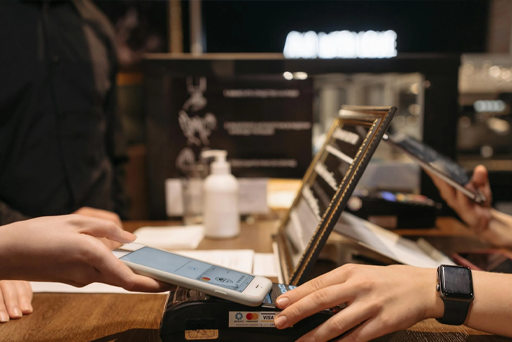
With the rise of mobile technology, traditional point-of-sale systems have evolved into sleek, portable versions that bring added flexibility and efficiency to businesses. Mobile POS (mPOS) systems are becoming a staple in modern retail, helping businesses process transactions on the go. But how do they work? Let’s break down the details.
What is a Mobile POS System?
A mobile POS (mPOS) system is a portable, digital solution for managing transactions, typically powered by a smartphone or tablet. Unlike traditional POS setups that are confined to a checkout counter, mPOS systems allow businesses to accept payments from virtually any location with a Wi-Fi or cellular connection. This flexibility is beneficial for retail, restaurants, events, and any business seeking to streamline sales without a fixed checkout area.
Components of a Mobile POS System
A mPOS system consists of several key components that work together to process transactions:
Mobile Device
Usually, a tablet or smartphone that hosts the POS software.
POS Software
The software application that manages the entire checkout process, including product catalog, sales tracking, and payment processing.
Card Reader or NFC Device
Hardware that enables payment acceptance, including swiping, dipping, or tapping a card. Some systems also support QR codes and digital wallets.
Receipt Printer (Optional)
A small, portable printer for issuing paper receipts.
Cloud-Based Inventory & Reporting
A cloud server that stores sales, inventory, and customer data for easy access and analysis.
Mobile Payment Processing: Step-By-Step
A mobile POS transaction involves several stages. Here’s a step-by-step look at how payments are processed through an mPOS system:
Set-Up & Product Entry
Initially, the business sets up the mPOS system by entering product details, prices, and relevant inventory information into the software. This can be done manually or through integration with an inventory management system.
Payment Initiation
When a customer decides to make a purchase, the cashier selects the items from the product catalog and initiates the payment process on the mobile device.
Transaction Authorization
The mPOS system connects with the card reader, either through Bluetooth or directly, to begin the payment process. The customer swipes, inserts, or taps their card, or scans a QR code for contactless payments.
Payment Approval
Once the payment details are sent, the mPOS system communicates with the payment processor, typically through a secure internet connection. The processor checks the validity of the payment method and authorizes the transaction.
Receipt Issuance
After approval, the system generates a digital or printed receipt, which is given to the customer. Most mPOS systems offer the option to send receipts via email or SMS.
Inventory and Sales Update
Once the transaction is complete, the mPOS system automatically updates the inventory and sales records. This real-time update helps businesses keep track of stock levels and revenue.
Security Measures
mPOS systems incorporate security measures such as encryption, tokenization, and compliance with PCI-DSS standards to protect customer payment data.
Benefits of Using a Mobile POS System
Flexibility
An mPOS system allows businesses to accept payments in various locations—whether it’s on the retail floor, at an outdoor event, or for curbside pickup.
Affordability
Compared to traditional POS systems, mPOS systems are typically more cost-effective, with lower hardware costs and subscription fees.
Improved Customer Experience
With mPOS systems, checkout can happen anywhere in the store, reducing wait times and enhancing the overall shopping experience.
How to Choose the Right Mobile POS System
When selecting an mPOS system, businesses should consider factors such as the type of payments they need to accept, integration options, and data security. Some businesses may benefit from an mPOS with advanced reporting features, while others may prioritize an easy setup and low fees.
A mobile POS system is a powerful tool for modern businesses, providing flexibility, convenience, and an enhanced customer experience.
Get in touch with experts at Coast 2 Coast Payments for help choosing the right mPOS system for your business!